@tvolker Please refer to the custom template - “Multi-Select” provided at web-kore-sdk/UI/custom/customTemplate.js at master · Koredotcom/web-kore-sdk · GitHub The CSS support for this template is added here: web-kore-sdk/UI/custom/customTemplate.css at master · Koredotcom/web-kore-sdk · GitHub
Sample Code Snippet:
var message = {
		"type": "template",
		"payload": {
		"template_type": "multi_select",
		"elements": [
		{
		"title": "Classic T-Shirt Collection",
		"value":"tShirt"
		},{
		"title": "Classic Shirt Collection",
		"value":"shirts"
		},
		{
		"title": "Classic shorts Collection",
		"value":"shorts"
		}
		],
		"buttons": [
		{
		"title": "Done",
		"type": "postback",
		"payload": "payload"
		}
		]
		}
		};
		print(JSON.stringify(message));
Output when rendered on webSDK:
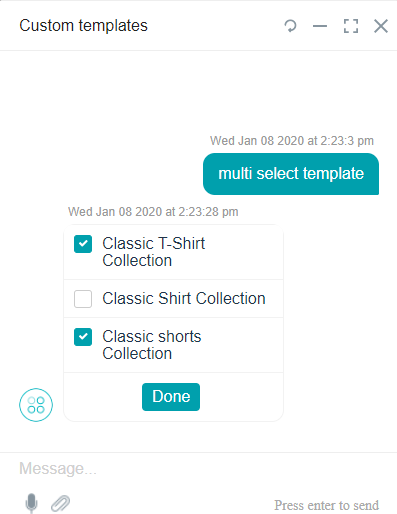
Please note that the custom templates are provided for you at webSDK to refer and build your own templates.
Refer to below topic on developer docs for more details: